New Features
Threat Center is out of beta
Review and act on the mail that needs attention, from one page.
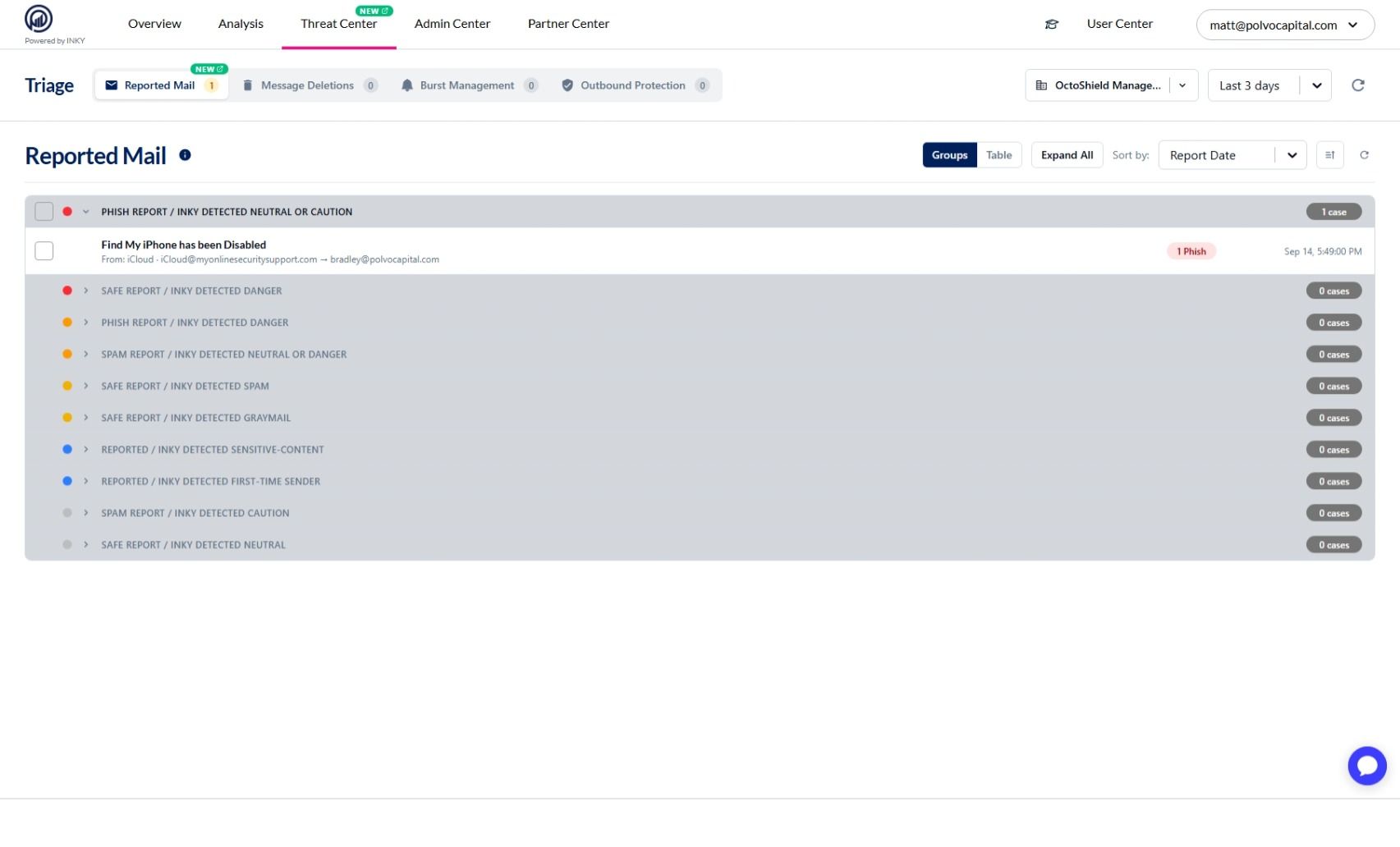
Threat Center is generally available. It brings the queues that need a decision into one place — reported mail, in-flight message deletions, burst activity, and account takeover enforcements — each with a live count in the tab bar so you can go straight to the one that needs work.
It was previously called Triage; the name changed in an earlier release and the tabs are unchanged.
Learn more: Using the Threat Center Page
Reported Mail is on for every team
See what your users reported, grouped by message, and act on the whole group at once.
Reported Mail was enabled team by team while it rolled out. It is now available to all teams as the first tab in Threat Center.
Reported emails are grouped by message rather than listed one report at a time, so a message several people reported is one row you act on once.
Learn more: Reported Mail
Account Takeover detection is out of beta
Spot a compromised account by the way it starts sending, and act before it reaches your customers.
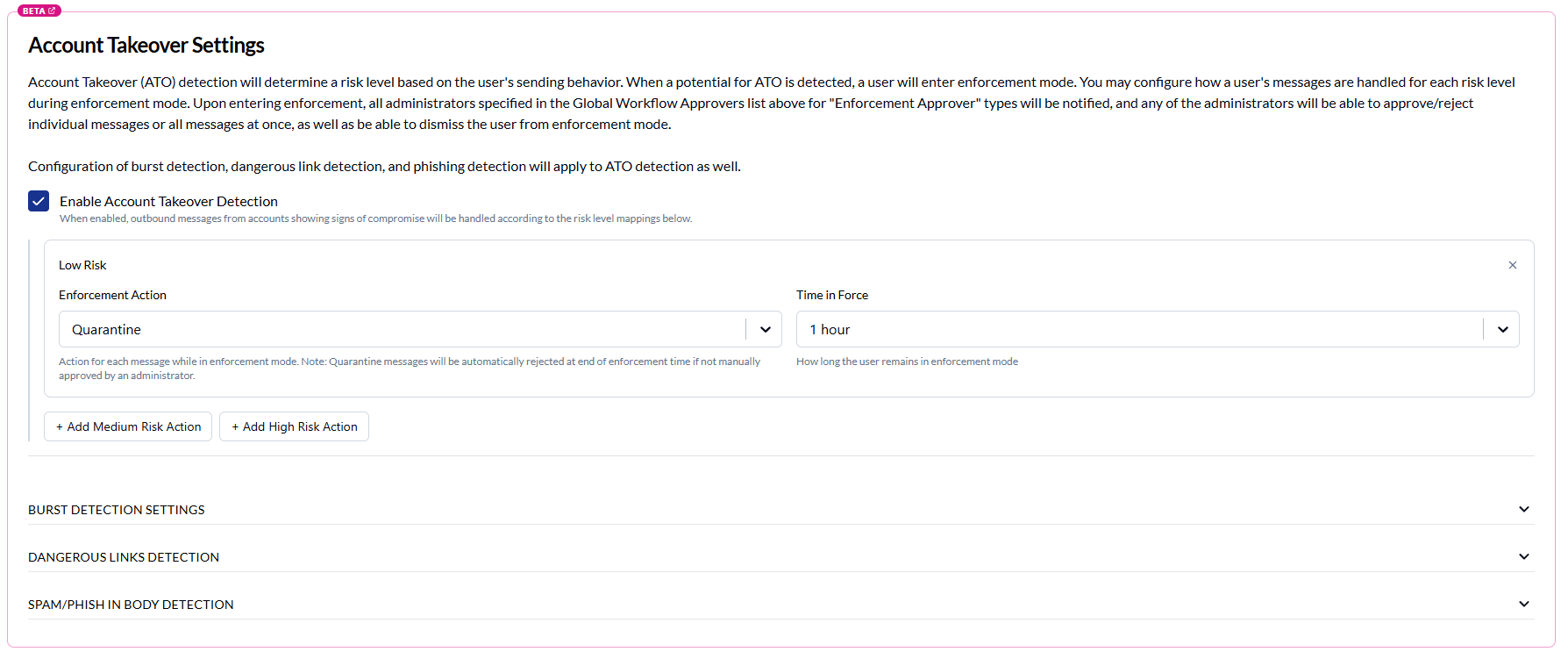
Account Takeover (ATO) detection is generally available. It scores outbound mail from each of your users on three signals — message bursts, dangerous links, and spam or phishing content — and puts a user into enforcement mode when their score crosses a risk level you have configured.
While a user is in enforcement, their outbound messages are delivered, quarantined or discarded according to the action you set for that risk level, and your ATO enforcement approvers are notified so they can review the messages and release the user.
Learn more: Account Takeover (ATO) Detection
Improvements
Clearer, more accurate LLM Assistance settings
Understand exactly what the setting governs and where your content goes.
The Analysis section formerly named "Smart Insights" is now "LLM Assistance", which is what the setting has always governed. It covers Smart Insights deep dives, a closer look at borderline messages, and review of AI Recommendations.
The description now names the managed LLM service used, states that requests are processed in the region your tenant is deployed in, and notes that US and EU tenants are served by separate INKY instances.
It also makes clear that turning LLM assistance off leaves the rest of detection running: machine learning, computer vision, sender profiling, and URL and attachment analysis are unaffected.
Learn more: Smart Insights feature guide
Fixes
Teams and team selection
Your team selection survives a slow start. After a deployment, the first lookup of your teams can take longer than usual while the service warms up, and an empty answer used to be indistinguishable from “you administer exactly one team”. Every page then showed your team name as fixed text with no way to change it, and the team you had chosen was replaced with your default team. A lookup that fails is now recognized as a failure: the picker stays usable, the team you had selected (or linked to) is found through search instead of being discarded, and the lookup is retried. Learn more: Switching Teams & Time Ranges
Home no longer returns to your default team after a failed lookup. It used to drop a remembered team that the lookup did not list, and a failed lookup lists nothing.
Picking a team found through search no longer fails to take effect. The selection is resolved from the search results, not from the full team list alone.
Outbound rules
Saving a rule the server rejected used to close the editor as though it had worked, and a failed clone quietly refetched the list. Both now report the failure in place and leave your work on screen.
An empty "This team's rules" heading no longer renders on teams that have no rules of their own.
Reports and navigation
Clicking a source or a user on the Graymail report now opens a list of that sender's graymail. It used to filter on the sender's address alone, so it returned everything they had ever sent.
The User Center dropdown no longer opens underneath the Observations Quick Search bar, and the "Message List" tab no longer paints over the open search menu.
Sign-in and account
A slow sign-in no longer shows a "couldn't load your account" notice beside a working dashboard. The notice used to stay for the rest of the session, on every page. This mostly affected partner logins, where the account lookup slows down as the number of teams grows.
Opening group management without the necessary permission now says permission is missing, instead of returning a server error page.
Trials and imports
A customer onboarded during a partner's evaluation no longer sees that partner's trial view. Trial state is now read from the team's own state, so nobody sees a setup band or a countdown for an evaluation they had no part in.
The Partner Center licenses page recovers on its own when a Graphus match goes stale. It used to stop with an import error.